Sitesसाइटहरू
Set up each site with its own details, rates, team and opening balances, then move between them in a tap.
The same six things every contractor tracks — kept together instead of spread across a notebook, a spreadsheet and three phones. The full list is further down.
Set up each site with its own details, rates, team and opening balances, then move between them in a tap.

Income, expense, advances and transfers — entered as they happen, with bank, wallet and cash balances kept in step.

Your own rates for materials, labour and services, so an estimate and the bill that follows it use the same numbers.

Mark the day’s workers in seconds and let the wage total build itself instead of being counted again at the end of the month.

Project, cost and resource summaries built from the entries you already made, exported to PDF or Excel.

Materials and equipment tracked per site, so what was bought, what moved and what is left all agree.
Sites
A site carries its own rates, its own team and its own balances, so nothing gets mixed up between projects and nothing is left sitting in someone’s notebook.
 Its own rates, team and opening balancesA day book of everything entered against it that daySwitch between sites without switching accounts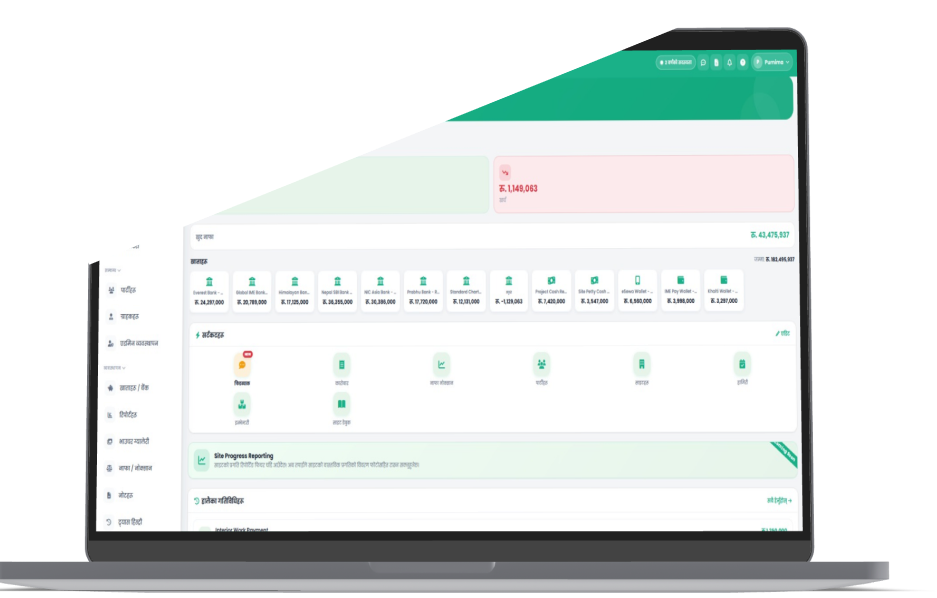
Money
Record income and expenses as they happen and photograph the voucher straight from your phone. Bank, wallet and cash-in-hand stay in step, and the profit or loss on each site updates with the entry.
Voucher and bill photos attached to the entryBank, wallet and cash balances in one viewProfit or loss per site, not just per company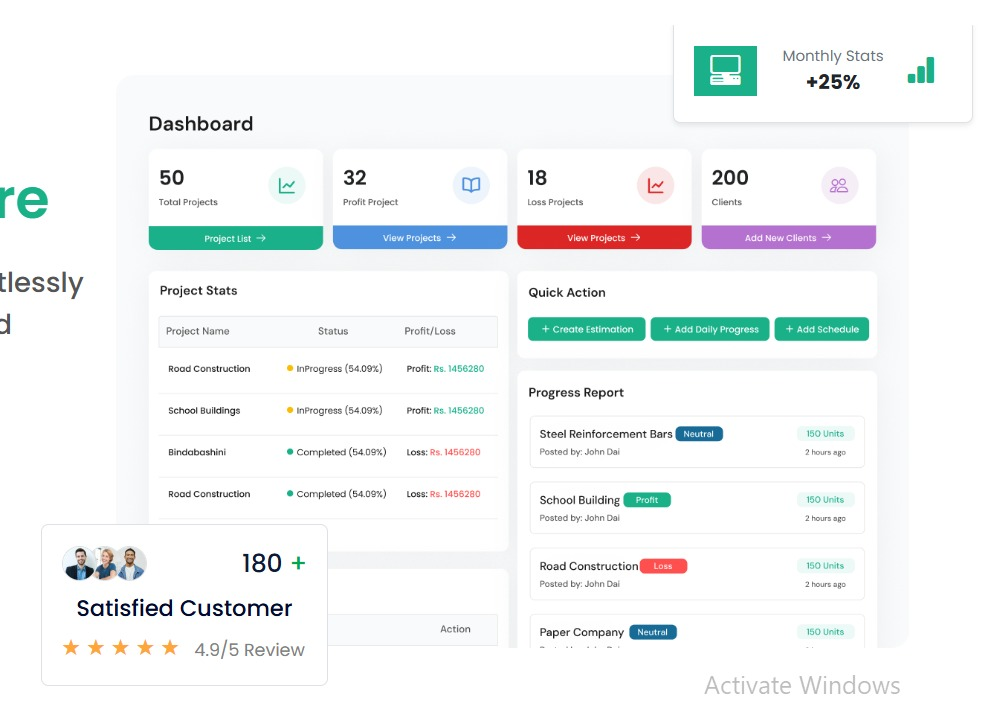
People & parties
Mark who worked today while you are still standing on the site. Every party and sub-contractor keeps a running ledger, so the month-end conversation starts from a shared number instead of two different notebooks.
Daily attendance marked in seconds, on the phoneA running ledger for every party and sub-contractorStaff accounts with only the access they need
Reports
Nothing has to be typed up twice. Every entry already made becomes a project, cost or resource summary you can hand to the client, the bank or your own file — and the paper stack stops growing.
Project, cost and resource summariesExports to PDF and Excel whenever you want themYour data leaves with you, in formats you already use
The whole app laid out. Everything here is included in a paid plan — the sites you can run is what changes as you grow.
The spine everything else attaches to.
Multi-site setup — per-site rates, team and opening balancesClient records tied to their sites and ledgersSite day book — every entry made against a site that dayOne-tap switching between sites, one loginDashboard & recent activity feed across all sitesNotes kept against a site or project
From a rough number to a full engineering BOQ.
Quick Estimate built on your own ratesEngineering BOQ (Norm Project) — chapters, work items, rate analysis, PDFNorm template & category library to reuse across projectsRate Master — materials, labour and services in one bookRegion-based rate multipliers for pricing by areaEstimate report — history and summary of your estimates
Every rupee in and out, with the bill attached.
Income & expense entry with voucher and bill photosAdvances and transfers between bank, wallet and cashBank, wallet and cash-in-hand balances kept in stepParty ledgers — a running balance for every party and sub-contractorParty payments with TDS withholding, and party expensesRetention tracking and profit / loss per site
The site team, marked while you are still on site.
Daily attendance marked in seconds on the phoneWage totals that build themselves as the month goesEmployee records with rates and detailsStaff accounts with only the access they need
What was bought, what moved and what is left — all in agreement.
Inventory — purchase, transfer and usage tracked per siteMaterial and material-group catalogueEquipment records with a usage-cost logStock that reconciles instead of drifting
Built from entries you already made.
Daybook, profit & loss, expense and global ledgerFinance, material, attendance, voucher, site and party-detailVAT report and TDS report, paginatedEstimate report — quick-estimate historyPDF and Excel export across the board
The parts that make it usable day to day.
Nepali / English toggle — the numerals switch tooNotifications and in-app feedbackSubscription & billing with local payment methodsReferral & earn programmeAdmin panel for your organisationAn add-on suite that turns the estimate into progress, progress into bills, and the whole job into a live profit-and-loss picture.
Record progress against each BOQ work item, with photos, straight from the site.
A second person checks each entry before it counts toward a bill or a report.
Estimated rate versus actual rate on every work item, updated as progress lands.
Link an inventory usage to a work item so its real material cost shows in the forecast.
Generate the interim payment certificate from verified progress, not a fresh spreadsheet.
Set an advance per project and let each Running Bill recover its share automatically.
An optional designated approver has to sign off before a bill can be finalised.
Plan the programme and assign manpower to the tasks on it.
The day’s work, weather, labour and issues — submitted and approved in the app.
Additions and omissions; approval updates the BOQ quantity and the project total.
A roster, a per-project agreement and running bills for every subcontractor.
Every service and repair against a machine, with its cost.
Rent-out income against usage and maintenance cost — net P&L per machine.
A dashboard, timeline and charts over the forecast and schedule-health data.
Contractor Pro is enabled per account. It ships as a free 90-day beta — talk to us to switch it on for your team.
Enter on the phone while the work is happening; sit down at the web app when it is time to check, correct and hand over.
| What you are doing | Mobile app | Web app |
|---|---|---|
| Creating and setting up a site | |
|
| Daily income and expense entry | |
|
| Marking attendance on site | |
|
| Party and sub-contractor ledgers | |
|
| Rate book and estimates | — | |
| Exporting reports to PDF and Excel | — | |
| Staff accounts and access | — | |
Same login, same data. Whatever is entered on one shows up on the other.
The details that decide whether an app actually gets used on a site.

The whole app switches between Nepali and English with one tap, and the numerals switch with it — so the site team uses it, not only the office.
Short forms, large targets and photo uploads, so an entry can be made standing in the dust with one hand free.
Vouchers, bills and reports export to PDF and Excel whenever you want them. Your data leaves with you, in formats you already use.